A well-written meta description helps searchers decide whether your page is worth visiting. Whether you’re launching a startup, running an eCommerce store, or publishing content about affiliate marketing, your search snippet should clearly communicate what visitors can expect. Meta description optimization is an important part of your on-page SEO efforts, even though meta descriptions aren’t a direct Google ranking factor. There’s one complication: Google doesn’t always display the meta description you write. It may generate a different snippet from your page when that better matches a search query.
That’s why accuracy, relevance, and clear wording are more useful than simply filling a description with keywords.
In this guide, you’ll learn how to write effective meta descriptions using practical examples, length recommendations, common mistakes to avoid, and methods for evaluating search performance in Google Search Console.
In this article, I will show you how to write stellar meta descriptions that drive clicks.
First, let’s cover the essentials.
What Is A Meta Description?
The meta description is a snippet of copy of around 160 characters that briefly describes the contents of a web page.
It appears under the page title and URL on Search Engine Results Pages (SERP).
Here is an example.

Meta Descriptions: Why Bother About Them?
While meta descriptions aren’t a direct ranking factor, they:
- Increase click-through rates (CTR)
- With increased CTRs comes increased traffic.
- Increase on-page conversions (potentially).
- Empower you to control the narrative around your content.
- Helps you influence searchers’ behavior.
These benefits are so worthwhile that you must sharpen your copywriting skills so you nail your descriptions. Or, if you have more money than time, outsource meta description writing to a professional copywriter.
The Meta Description: Your Post’s Ad
So, what’s the purpose of a meta description?
Simple.
It’s your article’s advertisement.
If the ad is poor, searchers won’t be persuaded to check out the piece of content you are advertising.
Here are 7 elements of an effective meta description (ad):
- Stops the scroll so the searcher pauses and starts reading.
Searchers scan SERPs fast. An excellent description grabs attention, forces them to stop and concentrate on the copy. - Sucks the searcher into the copy—fast.
Relevant descriptions are magnetic. They instinctively pull searchers into the copy without them realizing it. - Serves an attractive benefit or sparks curiosity.
Searchers always ask, “What’s in it for me?” An excellent description dangles irresistible, juicy benefits in front of prospective readers. - Scratches a troubling itch the reader has.
People gravitate towards anything that helps them relieve or get rid of the pain completely. So if you promise a cure for their sickness, you’ll have their full attention. - Seduces the reader to take immediate action.
Noteworthy descriptions build anticipation and entice readers to click through to the post. - Sums up the contents of the page accurately.
Google loves descriptions that pinpoint what the page is about in a memorable way.
Because the meta description is your post’s ad, make it count; otherwise, your brilliant content won’t be read.
How Long Should a Meta Description Be?
A practical target for most meta descriptions is around 140–160 characters. This gives you enough room to summarize the page while keeping the text concise. However, Google does not enforce a fixed character limit for meta descriptions.
Search snippets are shortened based on the available display space, which varies across devices and search result layouts. A description that appears in full on desktop may be truncated on mobile, and Google may display a different excerpt from the page altogether.
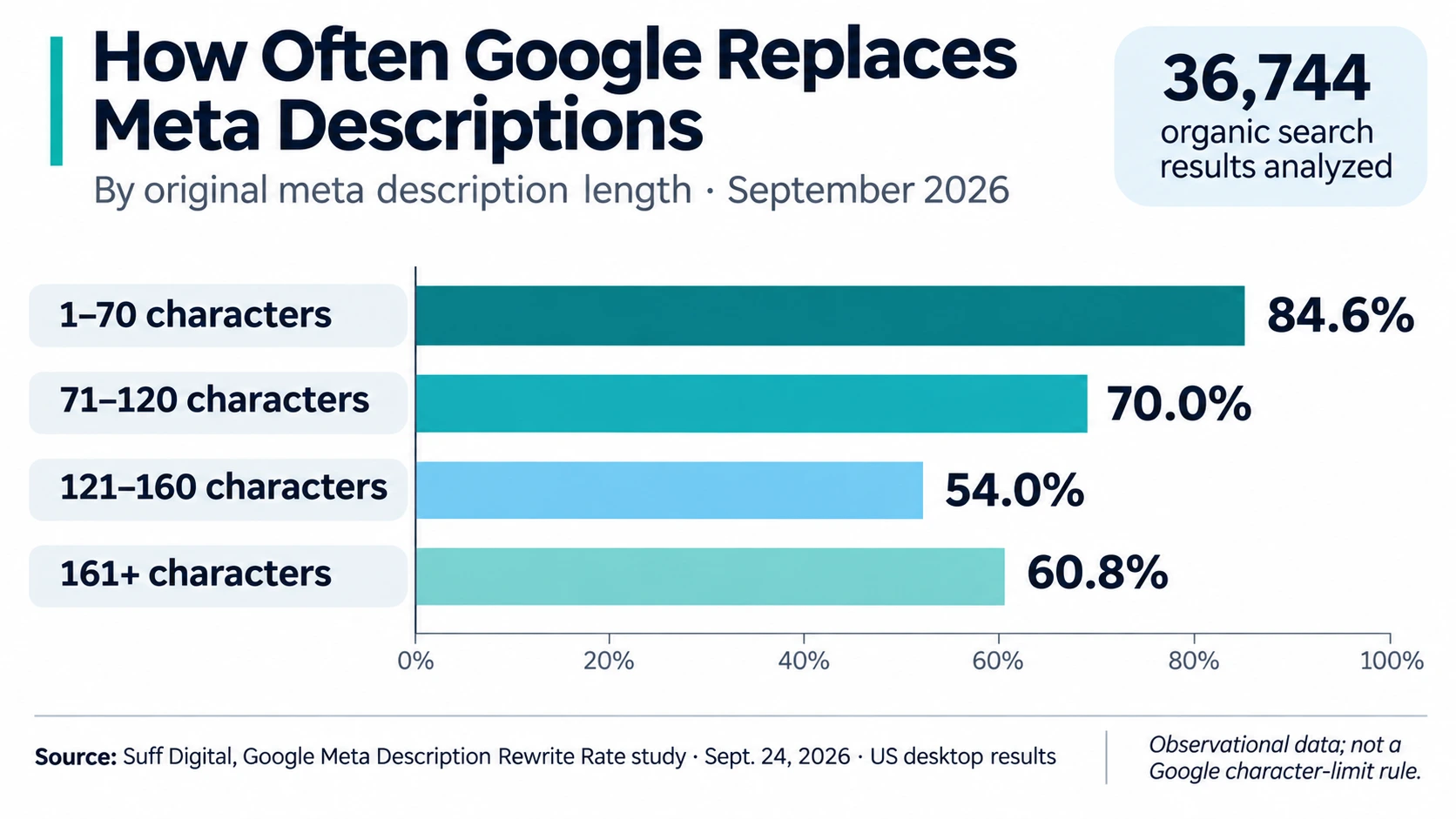
A September 2026 study by Suff Digital analyzed 36,744 Google search results and found that descriptions between 121 and 160 characters had the lowest rewrite rate in its sample, at 54%. Shorter descriptions of 70 characters or fewer were replaced 84.6% of the time. These findings support using a practical length target, although they do not establish an official Google character limit.
Rather than counting every character, focus on communicating the most useful information early. Mention the page’s main topic, include relevant details, and remove unnecessary introductions or promotional language.
Before publishing, use a SERP preview tool to check how your title and meta description may appear on desktop and mobile. Treat the preview as an estimate, not a guarantee of what Google will display.
For example, a 170-character description that accurately summarizes a complex product page can be more useful than a vague 150-character version. Clarity, relevance, and accuracy should come before an arbitrary character count.
According to Google’s official Search Central documentation, there is no fixed character limit for HTML meta descriptions. Google truncates search snippets when needed, typically based on the available device width. This is why the commonly recommended 155–160 characters should be treated as a practical guideline rather than a strict rule.
9 Easy Steps To Writing Magnetic Meta Descriptions
Wondering how you can craft winning meta descriptions that inspire searchers to click? Here are some quick tips to help you do just that.
Let’s jump in.
#1. Research Posts Ranking Front Page For Your Keyword
Discover and dissect the descriptions of page #1 content.
They are on the front page because they do something right. Evaluate their techniques.
- What do their descriptions have in common?
- Any words or expressions that stand out?
- What do they lead with in their copy?
- Does the copy include company branding?
- Are there any gaps you can leverage?
Emulate them, but with your twist.
Don’t forget to check Google AdWords as well for clues on what to do.
#2. Revisit Your Buyer Personas
Remember, your goal isn’t to attract the entire world to your site.
You want your ideal prospects. People who are most likely to take the next step in your customer journey and end up becoming loyal customers.
Remind yourself of their problems, pains, and dreams. Hook them by touching on some of their biggest needs and aspirations in your copy.
You could:
- Appeal to their dreams.
- Address their pain.
- Answer their biggest questions.
- Hook them with benefits.
In their post about timeline infographics, Venngage woos potential readers by telling them their guide is fool-proof and easy to follow because it’s step-by-step.

Because love reliability and easy stuff, they’re likely to click-through to the page.
#3. Speak To Searchers In Their Language
Another way to draw searchers into your copy is by speaking to them in their language.
No, I don’t mean French, English, or Russian.
I’m talking about the pain-point language. The words and phrases they use when they talk about concerns, frustrations related to the problems you solve.
But where do you get those expressions?
Easy.
Follow them to their favorite online watering holes:
- Niche forums.
- LinkedIn or Facebook groups.
- Twitter chats.
- The comment section of leading blogs.
Be on the lookout for phrases they use repeatedly, shared dreams, and popular expressions.
Once you’ve established their pain-point language, weave it into your copy.
When you reflect their words to them, they’ll identify with them and respond.
#4. Lead With Your Keyword But Don’t Force It
Feature your keyword in the meta description.
This instantly tells search engines, and people the focus of your article.
Some quick tips on how to include your keyword:
- Put your keyword in the first part of your sentence, but be reasonable.
- Including the keyword isn’t enough, make sure the sentence reads naturally.
- Your description must be useful, not keyword-stuffed.
#5. Be Hyper-specific, Avoid Blanket Terms And Cliches
Next, when crafting your meta description, be hyper-specific, not general.
Specificity is sharp and persuasive. Generality is bland and unconvincing.
Also, avoid jargon and cliches. They sound complicated but don’t communicate anything to the common users. Jargon is high-sounding nothing. Worse, it slows people down as they pause to understand them. That’s the last thing you want. Your goal is for searchers to move swiftly through your copy, click on your title, and read your content.
You are better off using simple, everyday language people grasp fast.
For instance, don’t say:
The guide exhibits how to master daily time management and have a couple of extra hours at your disposal.
Instead, say:
The guide shows you how to save time and shave off two-and-a-half hours out of your daily routine.
#6. Include A Riveting Call-To-Action
The goal of your snippet is to drive action, the precious click that takes searchers to your website so they consume your content.
The best way to do that is to use verbs that drive immediate action.
After all, a verb is a doing word to recite an elementary English class lesson. 😄
The following verbs are a significant starting point:
- Read.
- Learn.
- Discover.
- Get.
- Grab.
To entice users to click, urge them to do something.
#7. Write A Unique Description For Each Page
Every post must have a tailormade meta description.
Google recommends this:
- “Make sure that every page on your site has a meta description.
- Differentiate the descriptions for different pages. Identical or similar descriptions on every page of a site aren’t helpful when individual pages appear in the web results. In these cases, we’re less likely to display the boilerplate text.”
If you don’t have the time to write a new description for each page, focus on your most important content assets. Or, optimize descriptions of pages that are already getting organic traffic.
But don’t be lazy and use the same description for many pages.
Duplicate meta descriptions:
- confuse search engines and searchers.
- don’t describe what a specific page is about.
- don’t address what the user is searching for.
#8. Match The Reader’s Search Intent
Users type a search query into a search engine for a reason, right?
Put yourself in your reader’s shoes. What are they looking for?
People search online because they want to:
- Get certain information. (Informational Intent)
- Visit a particular website. (Navigational Intent)
- Researching products. (Commercial Investigation)
- Buy something. (Transactional Intent)
But you must go deeper than these general categories. Study top-ranking content to see what the specific user end-goal is and angle your description towards that.
Your description must persuade the user that your content will give them exactly what they are looking for.
#9. Align It To The Content Of The Page
Your meta description isn’t an independent entity.
It’s there to serve and promote your page.
No matter how silky or brilliant your description is, if it isn’t connected to the page content, it’ll fall flat.
For your description to work, tie it seamlessly to the main takeaways of your page content.
A misleading meta description can attract visitors who expect information the page doesn’t provide. For example, if your description promises a downloadable SEO checklist but the article contains no checklist, readers may leave disappointed.
However, a high bounce rate doesn’t automatically mean Google will lower your rankings. Focus on giving searchers an accurate preview of the page and making the promised information easy to find. Google may also generate its own snippet from the page content when that better matches a particular search query.
Meta Description Examples: Before and After
A good meta description tells readers what they’ll find on the page. Compare these examples to see how specific information improves a vague description.
1. Blog Post
Weak: “SEO tips and advice for better meta descriptions and online marketing.”
Better: “Learn how to write meta descriptions with before-and-after examples, length guidelines, and a practical checklist for your next page.”
The improved version names the information readers will get instead of relying on broad SEO terminology.
2. Ecommerce Product Category
Weak: “Buy running shoes online at great prices. Browse our amazing collection.”
Better: “Browse men’s trail running shoes with waterproof options, size filters, and customer reviews. Compare styles before you buy.”
This example works when the category page actually offers those features. Specific product information gives shoppers a reason to visit without making unsupported claims.
3. Local Service Business
Weak: “We provide the best plumbing services for all your needs. Contact us.”
Better: “Need a plumber in Austin? Explore available repair services, local coverage areas, and ways to request an appointment.”
The second description includes a location, service context, and a clear next step. It also avoids unverifiable claims such as being the best provider.
4. Software Review
Weak: “Read our software review to learn about features and pricing.”
Better: “Compare CRM pricing, contact management, automation, and reporting in a practical review covering plan limits and key trade-offs.”
Notice that the stronger description explains which topics the review covers. The reader can assess its relevance before opening the page.
These are illustrative examples, not descriptions copied from live websites. Always adjust the details to match what the actual page provides.
Why Does Google Rewrite Meta Descriptions?
Writing a meta description doesn’t guarantee that Google will display it. Google generates search snippets primarily from page content and may use the meta description when it provides a more accurate summary.
The same page can appear with different snippets depending on the search query. A description written for a broad keyword may not answer a more specific question, so Google may select a relevant passage from the article instead.
There is also no fixed 155- or 160-character limit imposed on the HTML meta description. Google truncates displayed snippets according to the available space, which can vary by device and search result layout.
The practical approach is to write a concise, accurate summary, place important details early, and ensure the page itself answers the queries you want to target. See Google’s official snippet documentation for its recommendations.
How to Audit Meta Descriptions in Google Search Console
Once your pages appear in Google Search, Search Console provides useful performance data to identify descriptions worth reviewing.
- Open the Performance report and enable Clicks, Impressions, Average CTR, and Average Position.
- Select the Pages tab and find an important URL with sufficient search impressions.
- Click the URL, then open the Queries tab to see which searches generate impressions.
- Review the actual search results for relevant queries. Check whether your title, displayed snippet, and page content answer the searcher’s question.
- Improve unclear titles or descriptions, then compare performance over meaningful periods after Google processes the changes.
CTR alone doesn’t prove that a description is weak. Ranking position, search intent, competing results, and device differences also influence clicks. Treat changes in performance as evidence to investigate, not automatic proof that an edited description caused the result.
For more context, read our guide to improving organic click-through rates.
Meta Description Examples: Before and After
Writing an effective meta description becomes easier when you compare real-world scenarios. The following examples show how to replace generic, forgettable copy with specific descriptions that match the page’s content and search intent.
Example 1: Blog Post
Weak description: “Find useful SEO tips and learn everything about writing better content for your website.”
Improved description: “Learn how to write meta descriptions with practical examples, length guidelines, and a simple checklist to improve your search snippets.”
Why it works: The improved version explains exactly what readers will find. It replaces vague promises with specific information and addresses the searcher’s likely question.
Example 2: Ecommerce Category Page
Weak description: “Shop our amazing collection of shoes at the best prices. Great quality and fantastic deals.”
Improved description: “Browse men’s trail running shoes with waterproof options, size filters, and customer reviews. Compare styles and find your next pair.”
Why it works: Shoppers get useful product details instead of empty promotional claims. Mentioning filters and reviews also communicates what the category page offers, as long as those features are available.
Example 3: Local Service Business
Weak description: “We offer professional plumbing services and excellent customer satisfaction. Contact us today.”
Improved description: “Looking for plumbing repairs in Austin? View available services, coverage areas, and appointment options from a local plumbing company.”
Why it works: The improved description includes a location, identifies the service, and provides a clear next step. This makes it more relevant to people searching for local plumbing assistance.
Example 4: Software Review
Weak description: “Read our complete CRM software review to learn about features, benefits, and pricing.”
Improved description: “Compare CRM pricing, contact management, automation, and reporting. See plan limitations and key trade-offs before selecting a platform.”
Why it works: The revised description highlights specific evaluation criteria. Readers can immediately tell whether the review covers the information they need.
These examples are illustrative, not excerpts from actual search results. The same principle applies to every page: describe the content accurately, highlight useful details, and avoid promises the page cannot support.
3 Common Meta Description Copy Mistakes To Avoid Like The Plague
People often make mistakes when writing meta descriptions. Here are the top three oversights and how to fix them.
#1. Leaving Out the Page’s Main Topic
A meta description should clearly communicate the page’s main topic. Including your primary keyword can help readers see its relevance, but you don’t need to force an exact phrase into every description.
For example, a guide about writing meta descriptions shouldn’t simply promise “better SEO results.” A more useful summary mentions meta description examples, practical writing tips, and snippet optimization. These details tell searchers what they’ll actually find.
Google doesn’t require an exact-match keyword in the meta description to generate a search snippet. It may use the description or select relevant text from the page based on the user’s query. Prioritize accurate information over keyword placement.
#2. Overusing The Keyword
Another common mistake is going to the other extreme of the first misstep—cramming the short copy with the keyword on every turn.
You’ll produce ridiculous copy no sane human wants to read.
The result?
Your CTRs will tank.
Instead, focus on the content’s benefits and user intent.
#3. Repeating Verbatim Snippets From The Page
An easy cop-out to writing unique descriptions is copying and pasting lines for your post.
While this is better than excluding a meta description altogether, it won’t produce results like writing a dedicated summary.
To achieve the best results, treat it like a pitch for your page. Pack it with well-thought-out persuasive language.
SERP Preview Tools For Smart Meta Description Optimization
Thankfully, plenty of SEO tools can help you to fine-tune your description.
Most of the tools allow you to:
- Preview the description (desktop or mobile version).
- Select the preview screen size.
- Suggest areas for improvement.
Yoast is one of the leading SEO tools that allow you to optimize the meta description in your WordPress dashboard. Here’s a preview of my post on how to write a content brief.

You can also use the following online tools.
These tools help you polish your copy and give your description the best chance to convince readers to try your content.
A study by Moz showed that, at the very least, Google uses 55% of meta descriptions as-is, or uses parts of them exactly as webmasters supply.
That said, Google sometimes ignores your meta description. In its place, it shows a part of the webpage copy it thinks better addresses the user’s query.
Meta Description: A Few Words That Pack A Big SEO Punch
Because meta descriptions are only 32 or so words long, they look insignificant. Not at all. Those few words make a big difference.
A-grade descriptions serve a crucial SEO purpose.
They boost the:
- Quantity of your traffic.
- Quality of your traffic.
- Conversions of your content.
So, whatever you do, spend time writing and optimizing meta descriptions because the results are worth it.

Andrej Fedek is the creator and one-person owner of three blogs: InterCool Studio, CareersMomentum, and Bettegi. As an experienced marketer, he is driven by turning leads into customers with White Hat SEO techniques. Besides being a boss, he is a real team player with a great sense of equality.