Do you see Instagram as a fun social media app for posting pretty pictures, and nothing more? To the average user, that may be true; from a business owner’s, manager’s, or digital marketer’s perspective, however, Instagram is one of the most effective marketing platforms, offering a lot of data and business insights.
As a business owner or digital marketer, you should be using Instagram to your advantage – especially if you want to grow as an Instagram influencer or make money on Instagram. A great starting point is using Instagram insights from your Instagram business account.
Let’s look at what Instagram insights are, how your business can benefit from them, and how you can access and use them to improve your Instagram marketing strategy.
Instagram Insights shows how your posts, Reels, and Stories perform through metrics such as views, reach, interactions, and follower activity. You can access these statistics through your Instagram dashboard to see which content attracts attention and engages your audience. This guide explains where to find Instagram Insights, how to read the key metrics, and what to do if your analytics are not showing.
What are Instagram Insights?
Instagram Insights is Instagram’s built-in analytics feature for public accounts. It shows how your content performs through metrics such as views, interactions, reach, and follower activity. Creator and Business accounts can also access additional analytics and professional tools through the Professional dashboard.
This data includes several insightful information on your audience, such as:
- How many people saw your post
- How many people engaged with your post
- The demographics of your audience
- When your audience is most active, and more!
Instagram Insights can benefit businesses of all sizes by providing valuable information you can use to improve your marketing strategy.
For example, if you notice your posts and Instagram stories get a lot of engagement but not enough reach, consider using more hashtags or running an Instagram ad.
On the other hand, if you notice your posts have plenty of reach but not much engagement, you may want to change the content you’re posting or use more calls to action.
The bottom line is that Instagram Insights can help you understand what’s working and what’s not on your account so you can make the changes needed to improve performance.
Let’s dig deeper into how you can leverage Instagram to boost your business’s social media marketing efforts.
How Can Instagram Help Your Business?
It didn’t take long for Instagram to become a powerful marketing tool. When Facebook bought it in 2012, it had 30 million users. The photo-sharing social media platform now boasts over two billion monthly active users and over two million business accounts.
Eyeing Instagram’s user engagement and strong prospects as a social media marketing platform, businesses of all sizes have turned to the platform for promoting their products and services and monetizing their Instagram accounts.
Here are some compelling reasons to use Instagram to promote your business.
- User engagement: Instagram is one of the most engaging social media platforms. The average time a user spends on Instagram is 30 minutes per day, giving you a great window to promote your services.
- Vast user base: With an enormous user base of over two billion monthly active users, it is easier to find your target audience on the platform and promote your products or services.
- Suitability for any business: Whether you have a small business or a large enterprise, you can use Instagram to reach your target audience. You can target specific localities or go global.
- Earning opportunities: If you have a large enough following, you can start earning money on Instagram by partnering with brands and promoting their products on your account.
- Stories and other features: Instagram offers stories and other features that can help you promote your business in an interactive and fun way. You can use these features to run contests and giveaways or creatively promote your products.
- Partnering with influencers: If you don’t have a large enough following on Instagram, you can partner with an influencer in your industry to promote your products or services.
- Active engagement with customers: Instagram allows you to engage with customers actively. You can respond to their comments, DMs, or reviews. This active engagement helps you build sustainable relationships with potential customers and prospects.
- Following the competitors: You can use Instagram or even the Facebook Ad Library to watch how competitors promote their products and what works for them. You can also get some ideas from their mistakes.
- Great visuals: Instagram is an excellent platform for promoting your business because it is a visual platform. People may find it more tempting to engage with posts that have attractive visuals.
- Mobile friendliness: Most users access Instagram from their mobile phones. This makes Instagram a great platform for promoting your business, as it is mobile-friendly and always accessible.
- Global presence: Instagram is a global platform with users from all around the world. This makes it easier for you to promote your products or services to a global audience.
- Hashtags: You can use hashtags to find relevant users and to make your posts discoverable. Instagram hashtags help you reach more relevant audiences organically.
- Paid advertising: You can also use paid advertising on Instagram to reach a larger audience with your promotions.
- Organic engagement: With creative content and relevant hashtags, you can organically engage with your target customers and get them to notice your business.
- Excellent insights: Finally, Instagram provides detailed insights into your posts, stories, and promotions. You can utilise these insights to improve your marketing strategy.
Now that we’ve looked at some of the reasons for using Instagram for business, let’s look at how Instagram insights can help you succeed as a professional marketer.
How Can You Access Instagram Insights?
Here are 5 easy steps to access your Instagram insights.
Step 1: Step 1: Check Your Instagram Account Type
Instagram Insights is available to public Instagram accounts. Creator and Business accounts can access analytics through the Professional dashboard, while public personal accounts can use Your dashboard. Private accounts do not have the same access to Insights.
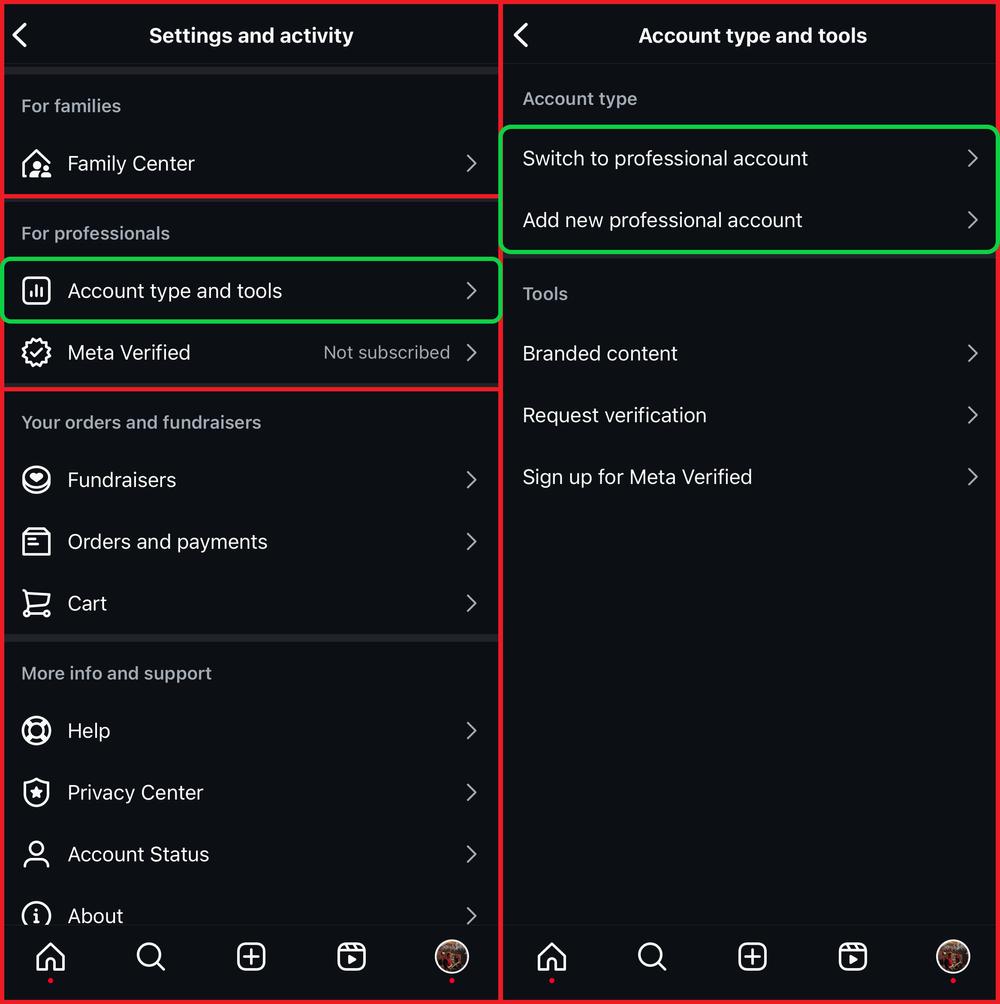
If you want additional professional features, open your Instagram profile, tap the menu icon in the top-right corner, and go to:
Settings and activity → Account type and tools → Switch to professional account.
Follow the instructions to select a Creator or Business account. Switching is free, and you don’t need to connect a Facebook Page to access Instagram Insights.
Menu names may vary slightly depending on your Instagram app version.
Step 2: Find Instagram Insights
Open Instagram and tap your profile picture in the bottom-right corner.
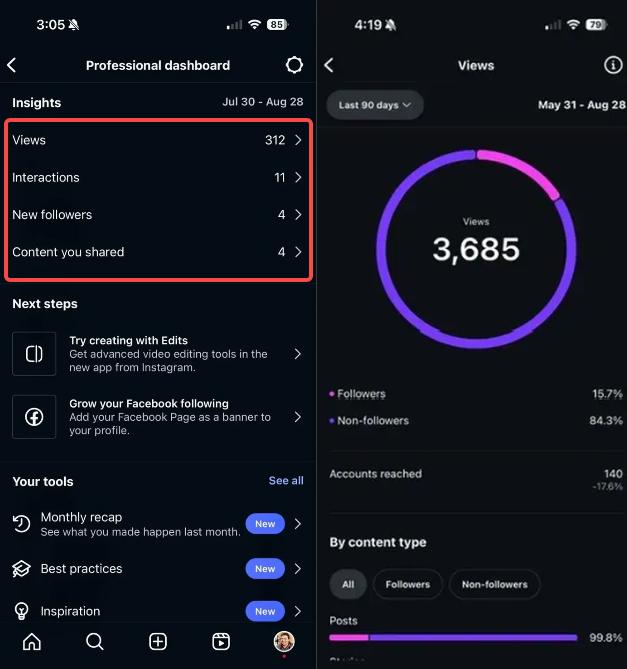
If you have a Creator or Business account, tap Professional dashboard. For a public personal account, look for Your dashboard.
The dashboard displays your main Instagram Insights metrics, including Views, Interactions, New followers, and Content you shared. Tap any metric to open a more detailed report.
If you cannot find the dashboard on your profile, open Settings and activity and look for Insights under For professionals, or Your dashboard under Your insights and tools.
You can also change the reporting period to review your performance over different dates.
Step 3: Read Your Instagram Insights Metrics
Once you open Instagram Insights, select a reporting period to review your account’s performance. You can use preset periods or a custom date range within the past 90 days.
The main Instagram Insights metrics include:
- Views: The number of times your content was displayed or played. Repeat views count, so one person can generate multiple views.
- Reach (Viewers): The number of unique accounts that saw your content. Unlike Views, each account is counted once.
- Interactions: Actions such as likes, comments, shares, and saves. These help you identify content that encourages engagement.
- New followers: Track changes in your audience and identify periods when your account gained or lost followers.
- Content you shared: Review the performance of individual posts, Reels, and Instagram Stories.
You can also find audience demographics, follower activity, and content-type breakdowns where sufficient data is available.
Tip: Compare Views with Reach. A post with 2,000 views and 800 accounts reached has generated repeat exposure, rather than reaching 2,000 different people.
Step 4: Instagram Insights for Specific Posts
To compare the performance of your Instagram content, open your dashboard and find Content you shared.
Select a content type, such as Posts, Reels, or Stories, to review the results for individual publications. You can filter the available content by date and performance metrics, depending on your account and app version.
Look at Views, Reach, Interactions, Saves, and Shares to identify which posts attract attention and encourage engagement.
For example, a Reel with high views but few shares may attract viewers without motivating them to share it. A carousel with fewer views but more saves could be useful content that people want to revisit.
Use these comparisons to identify successful topics, formats, and posting patterns rather than judging performance by views alone.
Step 5: Accessing Instagram Insights from Individual Posts
You can check Instagram Insights directly from an individual post without opening the full analytics dashboard.
Open one of your Instagram posts and tap View insights below it. For a Reel, open the video and select View insights from the available options.
For an active Instagram Story, open it and swipe up to review its performance. Insights for older Stories may also be available through your dashboard.
Depending on the content type, you can review:
- Views and Reach: How often your content was viewed and how many unique accounts saw it.
- Likes and Comments: How people reacted to your post.
- Saves and Shares: How often people saved your content or shared it with others.
- Profile Activity: Actions such as profile visits or follows associated with your content.
- Watch Time: Available for eligible video content, including Reels.
For example, a Reel with many views but few shares may attract attention without encouraging viewers to recommend it to others. Compare several posts to identify patterns rather than judging a single result.
Available metrics and menu labels can vary by account type and Instagram app version.
How to Use Instagram Insights To Level Up Your Social Media Marketing?
The main benefit of using Instagram Insights is better understanding your audience. Over time, it helps you tailor your marketing strategies to your audience and increase marketing ROI.
This information is essential because it helps you determine the best time to post, the most appropriate content, and how to gain more followers. Instagram insights will also help you track your progress and see how your account has grown.
Here are a few core benefits of using Instagram insights:
- Understanding audience demographics: Instagram insights will precisely tell you the age, gender, location, and other relevant demographic characteristics of your audience engaged with your posts. This crucial insight will help you develop more targeted advertising messages in future campaigns.
- Traffic source: Instagram Insights can show how your content reaches followers and non-followers. Some accounts and content types may show additional discovery information, but Instagram does not consistently provide a complete breakdown of views from Explore, hashtags, and other sources. Use the available data to identify content that reaches people beyond your existing audience.
- Tracking conversions: Instagram Insights shows engagement and certain profile actions, but it does not provide a complete picture of website sales or leads. To measure results from Instagram traffic, use tracked links with UTM parameters and a website analytics tool such as Google Analytics 4. This helps you connect Instagram campaigns with visits and conversions on your website.
- Taking post-specific actions: If you see a post performing well, you can take specific actions to improve its reach further, such as using more relevant hashtags, tagging other users, or running an Instagram ads campaign.
- Identifying areas for improvement: If you notice your posts aren’t getting much engagement, it may indicate you need to adjust your content strategy. Try posting more exciting, interactive content, using relevant hashtags, and attractive visuals.
- Monitoring growth: By monitoring your account’s growth, you can track your progress and see if your marketing efforts are paying off. If you see a significant increase in your followers and engagement rate, your strategies are working, and you should continue with them.
Instagram Insights Not Showing? How to Fix It
If your Instagram Insights are missing, unavailable, or not updating, start by checking your account settings.
- Check your account privacy: Instagram Insights requires a public account. If your profile is private, you won’t have the same access to analytics.
- Find the correct dashboard: Creator and Business accounts use Professional dashboard, while eligible public personal accounts can access Your dashboard.
- Review your reporting period: Select a different date range if your current period shows little or no activity.
- Check older posts: Some historical insights may be unavailable, particularly after changing account types.
- Update Instagram: Install the latest app version, restart the app, and check whether the dashboard loads correctly.
If individual metrics are missing, your account may not have enough activity to display them. Audience demographics, for example, may require a minimum number of reached or engaged accounts.
If the problem continues, report it through Instagram’s Settings and activity → Help → Report a problem. Available features and reporting options can vary by account and region.
Wrap-Up: Using Instagram Insights
Instagram Insights is most useful when you compare results across multiple posts, Reels, and Stories. Review Views, Reach, saves, shares, and follower changes to see which content consistently attracts attention and encourages engagement.
For example, if your Reels receive plenty of views but few new followers, experiment with topics that give viewers a reason to visit your profile. If your carousels generate more saves, consider publishing additional guides on similar subjects.
Whether you manage a brand’s social media presence or work as an Instagram influencer, use these results to plan your next posts and measure what improves over time.
How do I see my Instagram Insights?
Open your Instagram profile and tap Professional dashboard if you have a Creator or Business account. From there, open Insights to review views, interactions, follower activity, and individual content performance. Available dashboard options may differ by account type and app version.
What is the difference between Views and Reach on Instagram?
Views measure how many times your content was displayed or played, including repeat views. Reach measures the number of unique accounts that saw your content. For example, 1,000 views could come from fewer than 1,000 individual accounts.
Why are my Instagram Insights not showing?
Instagram Insights may be unavailable because of your account type, privacy settings, limited activity, or a temporary app issue. Check your dashboard, update Instagram, and try another reporting period. Some audience metrics only appear when enough data is available.
Can Instagram Insights show who viewed my profile?
No. Instagram Insights may show aggregate profile activity, but it does not reveal the identities of people who visited your profile. Instagram Story viewer lists are a separate feature and do not provide a history of profile visitors.
Can I see Instagram Insights for older posts and Reels?
You can often review Insights for older posts and Reels by opening the content and selecting View insights. However, the availability of historical metrics depends on the content type, account history, and Instagram’s reporting limits. Some older data may no longer be accessible.

Damian, better known as Damo, is an entrepreneur and marketing veteran with a career spanning 17+ years and nine startups across three continents. From ad agencies in Dubai to crowd-funding platforms in Ghana, Damo has garnered his experience from around the world and is now sharing everything he knows at Damobrennan.