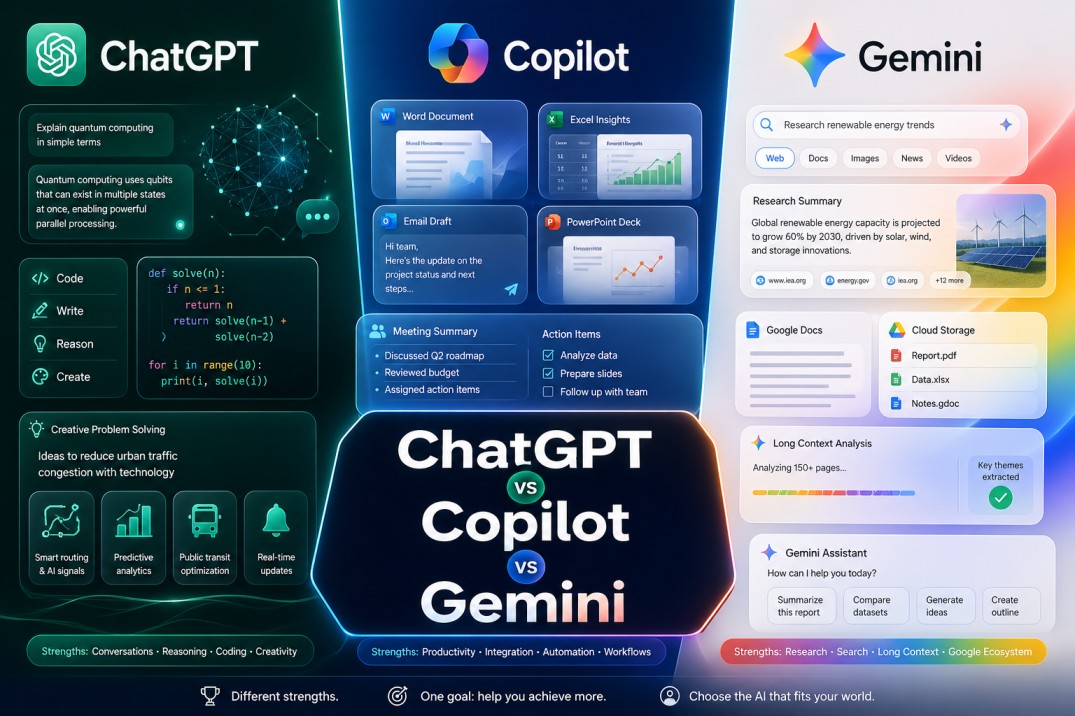
ChatGPT vs Microsoft Copilot vs Gemini is one of the most useful AI chatbot comparisons for anyone choosing a daily assistant for work, study, research, writing, coding, and productivity. All three tools can answer questions, summarize information, draft content, and help with everyday tasks, but they are built around different ecosystems and work styles.
The best AI chatbot is not always the one with the longest feature list. It is the one that fits where your work actually happens.
ChatGPT is the best all-around choice for flexible work. Microsoft Copilot is the best fit for people who live inside Microsoft 365. Gemini is the strongest option for users who rely on Google apps, long-context research, and Google’s broader AI ecosystem.
ChatGPT vs Microsoft Copilot vs Gemini is a comparison of three major AI chatbots built for different workflows. ChatGPT is the strongest all-around assistant for writing, research, coding, content creation, and problem solving, Microsoft Copilot is best for users who work mainly inside Microsoft 365 apps, and Gemini is best for people who rely on Google products, long-context research, and Google’s AI ecosystem.
ChatGPT vs Microsoft Copilot vs Gemini: The Basic Difference
The easiest way to understand this comparison is to look at the ecosystem behind each tool.
ChatGPT is OpenAI’s general-purpose AI assistant. It is built for conversation, writing, research, coding, file analysis, brainstorming, content creation, image generation, custom workflows, and business productivity. OpenAI’s current ChatGPT plans include Free, Plus, Pro, Business, and Enterprise options.
Microsoft Copilot is designed around Microsoft 365. It works especially well for people who use Word, Excel, PowerPoint, Outlook, Teams, Loop, and other Microsoft work apps. Microsoft says Microsoft 365 Copilot includes access to Copilot Chat and works across apps such as Word, PowerPoint, Excel, Outlook, Teams, and Loop.
Gemini is Google’s AI assistant. It is strongest for users who already depend on Google Search, Gmail, Docs, Drive, Chrome, NotebookLM, and other Google services. Google’s AI plans also bundle Gemini access with storage and Google app integrations, depending on the plan.
So the real question is not only “Which chatbot is smarter?” The better question is: which chatbot fits your workflow with the least friction?
ChatGPT vs Microsoft Copilot vs Gemini Comparison Table
| Category | ChatGPT | Microsoft Copilot | Gemini |
|---|---|---|---|
| Best for | Writing, research, coding, planning, content creation, analysis, and flexible daily work. | Microsoft 365 users who work in Word, Excel, Outlook, PowerPoint, Teams, and business documents. | Google users who rely on Gmail, Docs, Drive, Chrome, Search, NotebookLM, and long-context research. |
| Main strength | Best all-around flexibility across many types of work. | Deep Microsoft 365 integration and workplace productivity. | Strong Google ecosystem fit, long-context workflows, and AI bundles with storage. |
| Writing | Excellent for long-form content, rewriting, tone control, SEO, scripts, emails, and creative drafts. | Good for business documents, emails, summaries, and workplace communication. | Good for drafting, summarizing, research notes, and Google Docs-based work. |
| Research | Strong for structured research, source comparison, summaries, and complex explanations. | Strong when research depends on Microsoft 365 files, emails, meetings, and company context. | Strong for Google-connected research, long documents, NotebookLM-style workflows, and search-related tasks. |
| Coding | Very strong for debugging, explaining code, writing scripts, and building small tools. | Useful for technical help, but GitHub Copilot is Microsoft’s more developer-focused product. | Useful for code explanations, development help, and Google AI ecosystem workflows. |
| Best choice | Choose ChatGPT if you want the most flexible AI chatbot. | Choose Microsoft Copilot if your workday lives inside Microsoft 365. | Choose Gemini if you are already deep inside Google’s ecosystem. |
Where ChatGPT Wins
ChatGPT wins when you need one AI assistant that can move across many different types of work.
It is strong for writing, rewriting, coding, brainstorming, research, strategy, content creation, data analysis, image generation, and multi-step planning. That flexibility is the main reason many creators, marketers, founders, students, developers, consultants, and small teams use ChatGPT as their daily AI assistant.
ChatGPT is especially useful when the task is not confined to a single software suite. You can ask it to turn rough notes into a blog outline, rewrite a landing page, debug code, summarize a document, create a content calendar, explain a technical topic, or help plan a business workflow.
OpenAI also highlights strong workplace use cases around writing and research, and its work adoption report says go-to-market teams commonly use ChatGPT for writing, research, and media generation.
In this comparison, ChatGPT is the strongest general-purpose AI chatbot.
Where Microsoft Copilot Wins
Microsoft Copilot wins when your work already happens inside Microsoft 365.
If your company runs on Outlook, Word, Excel, PowerPoint, Teams, OneNote, SharePoint, and Microsoft Loop, Copilot has a natural advantage. It can help where the work already lives instead of forcing users to move content into a separate chat tool.
That matters because a lot of business productivity is lost in tiny admin tasks. Summarizing an email thread, preparing meeting notes, checking a spreadsheet, drafting a response, or turning a document into a presentation may not sound huge on its own. But across a full team, those small tasks add up.
Microsoft 365 Copilot Business includes Copilot in Teams, Outlook, Word, PowerPoint, and Excel, plus Work IQ and enterprise-grade security, privacy, and compliance.
So Microsoft Copilot is not trying to be the most flexible chatbot for every type of user. It is trying to be the best AI layer for Microsoft-powered work.
Where Gemini Wins
Gemini wins when your work depends heavily on Google.
If you use Gmail, Google Docs, Google Drive, Chrome, Google Search, Google Photos, YouTube-style research, and NotebookLM, Gemini can feel like the most natural fit. It is especially useful for people who want AI connected to Google’s ecosystem instead of Microsoft’s.
Gemini also has a strong value angle because Google AI plans combine Gemini access with Google One storage and other benefits. Google lists Google AI Plus with 200 GB of storage, Google AI Pro with 5 TB of storage, and Google AI Ultra with 30 TB of storage.
That makes Gemini interesting for users who do not only want a chatbot. They may also want cloud storage, Google app integration, research tools, and access to Google’s wider AI features.
In this comparison, Gemini is not always the best all-around chatbot, but it may be the most convenient option for Google-first users.
ChatGPT vs Microsoft Copilot vs Gemini for Writing
For writing, ChatGPT is usually the strongest option.
It handles long-form content well, understands tone instructions, rewrites weak sections cleanly, and can adapt to different formats. Blog posts, emails, scripts, outlines, SEO briefs, product descriptions, landing pages, social posts, and summaries are all natural ChatGPT tasks.
Microsoft Copilot is better when the writing task is done in Microsoft 365. If you need to improve a Word document, summarize a Teams meeting, draft an Outlook reply, or turn business notes into a PowerPoint outline, Copilot feels more convenient.
Gemini is strong when writing connects to Google Docs, Gmail, or research inside the Google ecosystem. It is also useful for summarizing large material and turning research into structured notes.
Verdict: ChatGPT is best for flexible writing. Microsoft Copilot is best for workplace writing inside Microsoft 365. Gemini is best for Google-connected writing and research.
ChatGPT vs Microsoft Copilot vs Gemini for Research
Research is more balanced.
ChatGPT is excellent for structured thinking. It can compare ideas, explain difficult concepts, summarize documents, organize sources, and turn messy notes into useful conclusions.
Microsoft Copilot is stronger when the answer depends on internal Microsoft 365 context. If the question involves company files, Teams meetings, email threads, or shared work documents, Copilot has an advantage because it can sit closer to that environment.
Gemini is strongest when the work is connected to Google Search, Google Docs, Google Drive, or NotebookLM-style research. Google AI Pro also supports a 1M-token context window and Deep Research features for more complex tasks.
Verdict: ChatGPT is best for general research and explanation. Copilot is best for Microsoft work context. Gemini is best for Google-connected research and long-context workflows.
ChatGPT vs Microsoft Copilot vs Gemini for Coding
ChatGPT is usually the best general coding assistant among the three.
It can explain errors, write scripts, debug code, suggest architecture, create HTML/CSS/JavaScript blocks, help with Python, build small tools, and explain technical concepts in plain language.
Microsoft Copilot can help with coding questions, but it should not be confused with GitHub Copilot. GitHub Copilot is Microsoft’s developer-focused coding product, while Microsoft Copilot is broader and more workplace-centered.
Gemini is also capable with code and can be useful for developers who use Google AI tools, Android-related workflows, or Gemini API resources.
Verdict: ChatGPT is the best general coding helper. GitHub Copilot is still the Microsoft product to compare if the article is focused only on developer workflows.
ChatGPT vs Microsoft Copilot vs Gemini for Office Work
Microsoft Copilot wins for office work.
That is its natural territory. Word, Excel, PowerPoint, Outlook, and Teams are where many office tasks take place. Copilot is designed to help users draft, summarize, analyze, present, and organize information inside those apps.
ChatGPT can still help with office work, especially if you upload files, ask for formulas, request summaries, or need writing support. But it is not embedded into Microsoft 365 in the same way.
Gemini is useful for Google Workspace users. If your office work is based on Gmail, Docs, Drive, and Chrome, Gemini may feel more natural than Copilot.
Verdict: Microsoft Copilot is best for Microsoft office work. Gemini is best for Google office work. ChatGPT is best when the work moves across many tools.
Pricing Comparison Table
| Plan Type | ChatGPT | Microsoft Copilot | Gemini | Best Value For |
|---|---|---|---|---|
| Free | ChatGPT Free is available for everyday AI tasks, with limited access to advanced models, uploads, image generation, deep research, memory, context, and Codex. | Microsoft 365 Copilot Chat is included for eligible Microsoft 365 business and enterprise users, but full Microsoft 365 Copilot features require a paid license. | Gemini Free is useful for everyday AI tasks, but advanced features, higher limits, and Google app integrations depend on paid Google AI plans. | Casual users testing AI before paying. |
| Main Paid Plan | ChatGPT Plus is the main individual paid plan for stronger access to ChatGPT features. | Microsoft 365 Copilot Business starts at listed per-user pricing and requires a qualifying Microsoft 365 plan. | Google AI Pro is listed at $19.99 per month and includes higher Gemini access, Google app benefits, and 5 TB of storage. | ChatGPT for flexibility, Copilot for Microsoft work, Gemini for Google users who also want storage. |
| Premium / Power User | ChatGPT Pro is aimed at heavier users who need more advanced access and higher capability limits. | Microsoft 365 Copilot scales into business and enterprise environments with admin, compliance, and workplace features. | Google AI Ultra is listed at $249.99 per month and includes the highest Gemini access, more AI credits, and 30 TB of storage. | Power users, research-heavy users, and teams with advanced AI needs. |
| Business | ChatGPT Business is built for secure team workspaces, admin controls, connected apps, and advanced business use. | Microsoft 365 Copilot Business is built for Microsoft 365 users who need AI inside Teams, Outlook, Word, PowerPoint, and Excel. | Gemini for Google Workspace and Google AI plans fit teams that already work inside Google’s ecosystem. | Teams should choose based on whether they live in OpenAI, Microsoft, or Google workflows. |
| Practical Verdict | Best value for broad AI flexibility. | Best value for Microsoft 365 productivity. | Best value for Google ecosystem users who also benefit from storage and Google app integration. | ChatGPT wins flexibility. Copilot wins Microsoft integration. Gemini wins Google ecosystem fit. |
Pricing note: Prices and plan features can change, so check official pricing pages before buying. Microsoft lists Copilot Business as requiring a qualifying Microsoft 365 plan, while Google lists Google AI Plus, Pro, and Ultra with different Gemini access levels and storage bundles.
Which AI Chatbot Should You Choose?
Choose ChatGPT if you want the best all-around AI chatbot. It is the strongest option for people who need help with writing, research, coding, planning, strategy, content creation, and problem-solving across many tools.
Which AI Chatbot Is Best for What?
ChatGPT, Microsoft Copilot, and Gemini each shine in different situations. The best choice depends less on hype and more on the kind of work you do every day.
ChatGPT
Best for WritingStrongest fit for content, ideas, reasoning, and coding help.
ChatGPT is usually the best option for writing, brainstorming, editing, summarizing, coding support, and flexible problem solving. It feels strongest when you need a general-purpose assistant that can move across different types of tasks without feeling locked into one ecosystem.
Microsoft Copilot
Best for WorkflowsStrongest fit for Microsoft 365 productivity and office tasks.
Microsoft Copilot is usually the best choice for people who live inside Word, Excel, PowerPoint, Outlook, and Teams. It makes the most sense for document drafting, meeting summaries, spreadsheet help, presentations, and workplace automation tied closely to Microsoft tools.
Gemini
Best for ResearchStrongest fit for research, search-linked tasks, and Google users.
Gemini is often the best fit for users who want research support, long-context analysis, and smoother connections with the Google ecosystem. It is especially useful when your workflow revolves around Google Docs, Drive, web research, and large blocks of information that need to be explored or organized.
If you want the shortest version, ChatGPT is usually best for versatility, Copilot is best for Microsoft productivity, and Gemini is best for research plus Google-based workflows.
Choose Microsoft Copilot if your work is centered on Microsoft 365. It is the strongest choice for people who spend most of their day in Outlook, Teams, Word, Excel, PowerPoint, and related business apps.
Choose Gemini if you are already a Google-first user. It is a strong fit for Gmail, Docs, Drive, Chrome, Search, NotebookLM-style research, and users who like Google AI plans bundled with storage and app benefits.
For many people, the answer is not permanent. A creator may use ChatGPT every day, a corporate team may prefer Copilot, and a Google Workspace user may find Gemini easier to keep inside their existing workflow.
Final Verdict
ChatGPT is the best all-around AI chatbot for most users because it is flexible, strong at writing, useful for research, capable with code, and easy to apply across many workflows.
Microsoft Copilot is the best AI chatbot for Microsoft 365 users because it integrates most closely with Word, Excel, PowerPoint, Outlook, Teams, and workplace documents.
Gemini is the best AI chatbot for Google ecosystem users because it integrates seamlessly with Google apps, supports long-form research, and aligns with Google’s broader AI subscription bundles.
The best choice depends on your daily workflow. ChatGPT wins for flexibility, Microsoft Copilot wins for Microsoft 365 productivity, and Gemini wins for Google-first users.
Which is better: ChatGPT, Microsoft Copilot, or Gemini?
ChatGPT is usually the best all-around AI chatbot, Microsoft Copilot is best for Microsoft 365 users, and Gemini is best for people who rely on Google apps and Google’s AI ecosystem.
Is ChatGPT better than Microsoft Copilot?
ChatGPT is better than Microsoft Copilot for flexible writing, research, coding, planning, content creation, and problem solving across different tools.
Microsoft Copilot is better when the work happens mainly inside Microsoft 365 apps such as Word, Excel, Outlook, PowerPoint, and Teams.
Is Gemini better than ChatGPT?
Gemini can be better than ChatGPT for Google-first users who work heavily in Gmail, Docs, Drive, Chrome, Search, and Google’s AI ecosystem.
ChatGPT is usually better as a general-purpose assistant for writing, coding, research, planning, and creative workflows.
Which AI chatbot is best for business?
Microsoft Copilot is often best for businesses already using Microsoft 365, while ChatGPT is better for teams that need flexible AI across writing, research, coding, marketing, support, and operations.
Gemini is a strong choice for companies and users already working inside Google Workspace and Google’s productivity ecosystem.
Which AI chatbot is best for writing?
ChatGPT is usually the best AI chatbot for writing because it handles long-form content, rewriting, tone control, outlines, SEO briefs, emails, scripts, and creative drafts very well.

Andrej Fedek is the creator and one-person owner of three blogs: InterCool Studio, CareersMomentum, and Bettegi. As an experienced marketer, he is driven by turning leads into customers with White Hat SEO techniques. Besides being a boss, he is a real team player with a great sense of equality.