The current AI wave is transforming how we create.
For YouTubers, marketers, and storytellers, generative artificial intelligence has opened a new frontier in video production. But harnessing this power isn’t about simply feeding a script into a machine. It requires a well-thought-out workflow and carefully designed prompts. This is where prompt engineering becomes the most critical skill in your creative toolkit.
It’s the bridge between your imagination and AI outputs.
This post is your practical guide to mastering prompt engineering, specifically for turning your video scripts into compelling, high-quality video content. We’ll move from the basics of prompt design to the advanced prompting techniques that separate generic content from cinematic, effective visual storytelling.
Prompt engineering for AI video tools means turning a finished script into clear visual instructions that guide the model scene by scene. Instead of asking AI to “make a video,” creators get better results by breaking the script into shots, defining the subject, action, setting, lighting, camera movement, mood, and style.
The strongest AI video workflows start with a locked script, then use structured prompts, shot lists, style references, and consistency cues to control the final output. This helps YouTubers, marketers, and creators produce videos that feel more cinematic, coherent, and useful instead of generic or random.
What is prompt engineering (and why it’s not just for language models)?
Prompt engineering is the art and science of crafting precise instructions (prompts) to guide an Artificial Intelligence model toward a desired outcome. You’ve likely heard about it in the context of large language models (LLMs), such as ChatGPT. The difference between a generic answer and a deeply insightful, structured response is a well-structured prompt. This level of precision can help sales teams analyze massive datasets to instantly identify a lucrative B2B opportunity.
But this skill isn’t limited to text.
The same principles apply to every form of generative AI, from image generation to music synthesis and, most powerfully, to AI video creation.
From text to image (TTI) to text-to-video: The evolution of generative AI models
Prompt engineering for AI videos starts with visual prompting. We first discovered the power of visual prompting with text-to-image models, such as Midjourney. You could type “a cat in a spacesuit on Mars, digital art” and get a stunningly specific, static image.
Text-to-video is the next step in prompting evolution. This leap introduces the complex dimensions of time, motion, and continuity. You’re no longer prompting for a single, frozen moment. You must now instruct AI models on:
- The emotional arc of a scene
- Camera movement
- Character actions
- Pacing
This complexity is why the video prompting technique is a distinct and far more dynamic skill.
Why ‘prompt engineer’ is your new role as a video creator
The generative AI video market is experiencing huge growth, increasing at 20% every year, according to Grand View Research. This rapid expansion, fueled by massive adoption, means most creators are now embracing AI video generators.
As a video creator, you’re already a storyteller, but your role is now expanding.
You’re not just a scriptwriter; you are the art director, the cinematographer, and the editor, all rolled into one. Your prompts are how you communicate your complete vision—from the “Wes Anderson color grading effect” in a scene to the subtle, low-angle shot that adds tension.
The script is your blueprint: Preparing your video content for AI
High-quality AI video production doesn’t start with AI. It starts with you.
The script is the foundational, non-AI asset that dictates the entire project’s success. An AI model can’t fix a weak or disorganized narrative. Before you write a single prompt, you must have a clear, well-structured, and finalized script.
Finalizing the script: The first step in a consistent AI video production workflow
Before you can deconstruct your script into prompts, that script must be “locked.”
This means it’s approved, finalized, and no longer subject to major changes.
The script serves as the blueprint for all your video prompts. After the final draft is complete, having a practical Word-to-PDF converter tool is handy. This allows the creator to finalize the script, lock in the formatting, and ensure that all stakeholders—from voiceover artists to editors—are working from a single, uneditable source document, thereby guaranteeing consistency across the entire production workflow.
Deconstructing your script into a sequence of video prompts
This is the first step in creating practical video prompts after you have finalized your script. The idea is to read through your script and visualize it as a sequence of shots rather than a block of text.
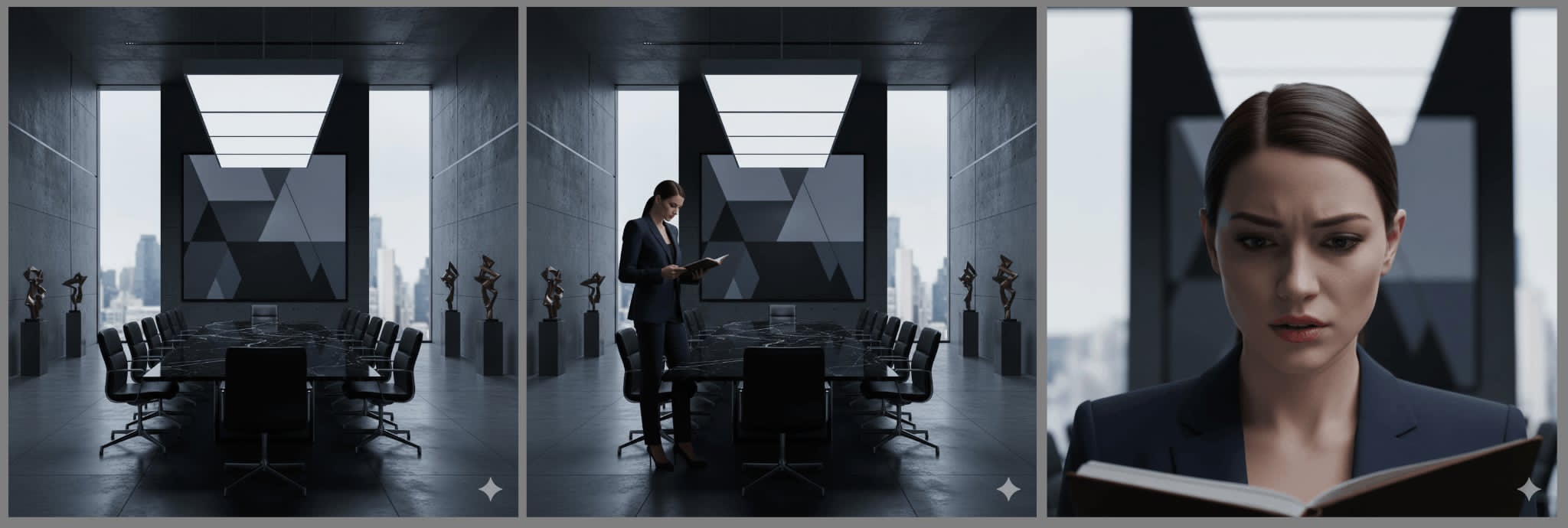
Break down each narrative beat into an individual, actionable prompt for an AI tool. A single sentence in your script, like “The new CEO felt the pressure of her first big meeting,” might become three distinct video prompts:
- Prompt 1: “A wide shot of a modern, intimidating boardroom, empty.”
- Prompt 2: “A medium shot of a woman in a sharp blazer, standing alone, looking at her notes.”
- Prompt 3: “A close-up on her face, showing a mix of determination and anxiety, under fluorescent office lights.”
(Image provided by author)
This “shot list” approach is the foundation for more advanced prompt chaining.
Applying ‘Chain of Thought Prompting’ to your video storyboard
In the world of LLMs, “Chain of Thought Prompting” is a technique that guides an AI through a complex problem by asking it to “think step by step.” For video, we can adapt this concept to build a logical and emotional storyboard.
Instead of asking for complex arithmetic reasoning, you’re guiding the AI’s “creative reasoning.” You chain your prompts to build a coherent sequence that makes sense to the viewer.
- Scene 1: “A cinematic wide shot of the Amalfi Coast at golden hour, ocean glistening.”
- Scene 2: “A medium shot of a happy couple dining on a clifftop balcony overlooking the same coast.”
- Scene 3: “A tight close-up shot of the two laughing, clinking wine glasses.”
Here’s the final result of this structured prompt using Google’s Veo 3.1 model:
Each part of the prompt builds on the last, creating a narrative “chain of thought” that the AI follows.
A practical prompt engineering guide for high-impact AI tools
Once your script is locked and storyboarded, it’s time to write the actual video prompts. This is where you translate your creative vision into specific, machine-readable instructions.
The 5 Ws of a perfect video prompt: Defining your video
A great video prompt is specific and leaves little to the AI’s imagination. A simple framework to use is the 5 Ws:
- Who: Describe your subject clearly.
- What: Describe an action, what is the subject doing?
- Where: Set the scene by describing the environment where the action is taking place.
- When: Define the historical framework, time of day, and possibly the lighting conditions.
- Why: This is your art direction; it’s about describing the video’s style and mood.
A weak prompt is “A man in an office.”
A strong prompt is: “(Who) A frustrated marketer (What) rubbing his temples (Where) in a cluttered office (When) under dim, late-night lighting. (Why) Moody, low-angle shot, cinematic.”
(AI video created by author)
Mastering style and art direction: How to get that ‘Wes Anderson color grading effect’
This is how you make your AI videos look unique. The “Why” of your prompt is where you inject your style.
Use specific language to control the look and feel.
- Color & grading (e.g., the Wes Anderson color grading effect)
- Lens & camera (e.g., shot on 35mm film)
- Composition (e.g., symmetrical composition)
- Special effects (e.g., with lens flare)
Experimenting with these style descriptors is the key to moving beyond generic-looking video content.
Prompt optimization for scene and style consistency
Few-shot learning is another technique used in language models, but it has a powerful application in video: character and style consistency.
In this context, it’s not about answering complex questions. It’s about “teaching” AI your desired style or character by giving it examples in your prompt sequence. Some multimodal models let you include images in your prompt, making few-shot learning simple.
If you want a character to remain consistent across scenes, you must “remind” the AI.
Beyond the prompt
Mastering single-shot prompts is the first step. The next step is to integrate this skill into your broader content generation workflow, particularly for marketers and business professionals.
Integrating AI video with your marketing strategy
AI video generators are not just creative tools; they’re powerful business accelerators. They allow marketing teams to create personalized video content at a scale that was previously impossible.
For those exploring fundamentals and benefits, resources like video production help explain how effective video content is created and used.
This is where your new prompt engineering skills connect directly to business goals.
Using AI video tools effectively requires understanding how to craft prompts that guide content generation. These capabilities also extend to AI-driven marketing, where automated video creation can:
- Streamline content production across multiple channels
- Enhance campaign personalization
- Increase audience engagement
Securing your AI-powered creator stack
The modern creator’s workflow is rarely limited to one tool. You’re likely using multiple AI models, cloud storage for your raw footage, external editing tools, and various APIs to connect them all. This “creator stack” can become a security blind spot.
As you stack editors, plugins, and model endpoints, unify security before you hit publish.
A unified vulnerability management layer scans every tool and asset, renders nodes and storage buckets for exposed secrets, outdated libraries, and risky permissions. You keep the prompt‑to‑publish flow fast while shrinking the attack surface around raw footage and brand assets.
Keeping your prompt engineering skills sharp
According to Reuters, there is a 50% skill gap for AI talent. That means two things:
- People with relevant AI skills, like video prompt engineering, will always find work.
- Those who already have these skills and continue to hone them will become top earners.
Regardless of your stance on AI-generated video, it’s in your best interest to master it. Like any other creative skill, prompt engineering is learned through practice.
The single most effective way to improve is to experiment. Try different prompts and see what happens. Tweak one word and observe the change in the AI output.
Beyond that, join creator communities to see what prompts others are using. Take AI courses and read model-specific prompting guides. This AI wave isn’t slowing down, and staying on top of it means committing to continuous learning.
Your new role as an AI video director
Prompt engineering is the bridge between your human creativity and the massive power of Artificial Intelligence. It’s the skill that ensures your vision is what drives the final product.
You’re being elevated. You’re no longer just a creator; you’re an AI video director. If you’re looking to stay ahead in the game, explore Intercoolstudio’s resources on AI tools, digital workflows, and content creation strategies to refine how you build and scale video content.

Andrej Fedek is the creator and one-person owner of three blogs: InterCool Studio, CareersMomentum, and Bettegi. As an experienced marketer, he is driven by turning leads into customers with White Hat SEO techniques. Besides being a boss, he is a real team player with a great sense of equality.